

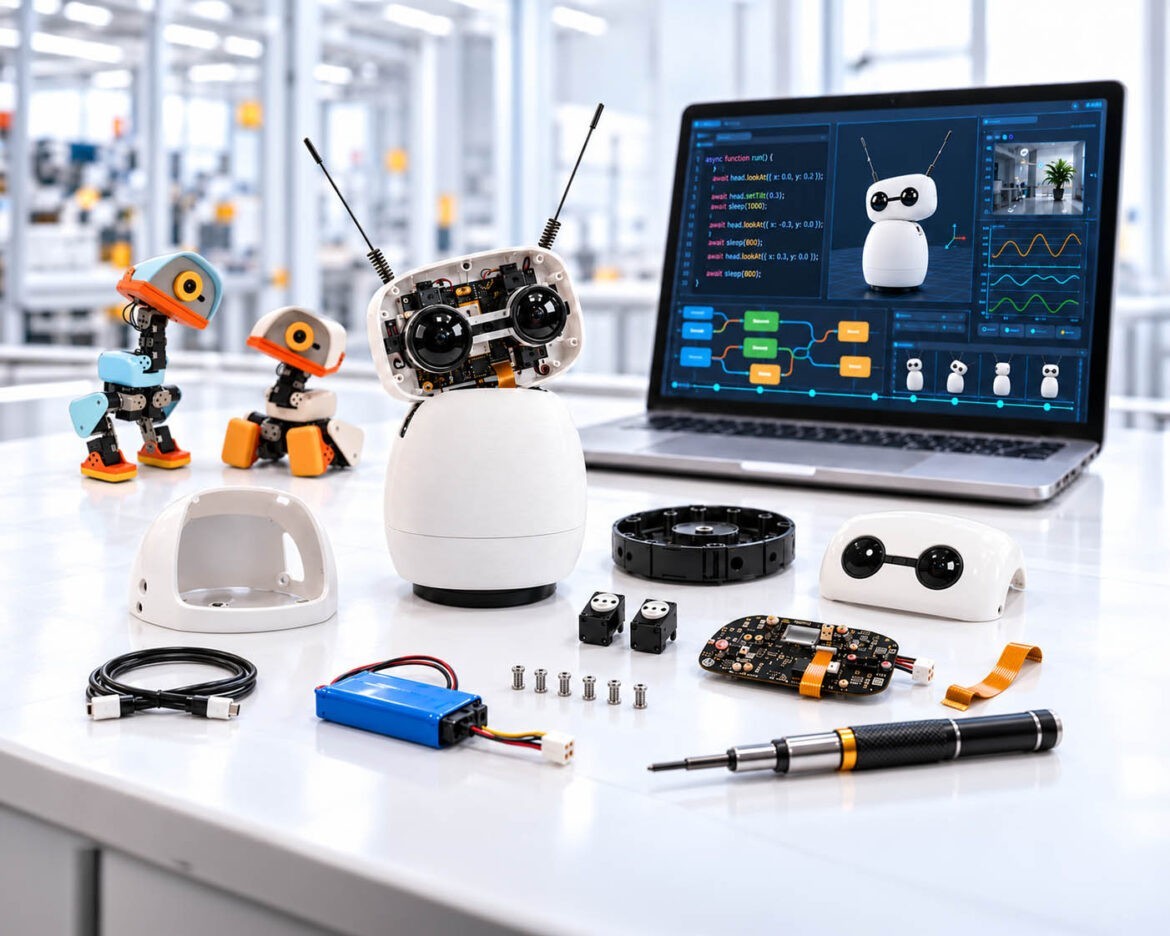
Building, programming and training make robotics understandable for teams.
Illustration: AI-assisted depiction modeled on the Pollen Robotics robots Reachy Mini and Microduck, kit parts, inner workings and screen content are freely designed, not a product photo | XR Stager Online Magazine | VISORIC GmbH
A robot that a team assembles itself in one morning, and a second one that learns to walk in a simulation, initially look like toys. Yet they make it possible to observe what companies need to understand before using robotics responsibly: how a sensor value becomes a decision, how the decision becomes a movement, and what happens when the ground suddenly changes.
Robotics is no longer a niche topic. The International Federation of Robotics (IFR) counted 542,000 newly installed industrial robots worldwide for 2024.[1] At the same time, 58 percent of the employers surveyed by the World Economic Forum expect robotics and automation to change their business by 2030.[2] Many companies therefore face the same question: how can the topic be understood before a major project has to be decided under time pressure?
One possible answer is educational robots and robot kits. This article presents two robots from the manufacturer Pollen Robotics: the Reachy Mini, which you assemble and program yourself, and the Microduck, which runs right away and learns new movements in a simulation. Above all, it puts into context what teams can learn from such experiments, where the limits lie, and how curiosity becomes a reliable pilot.
- Robotics is widespread, but the question of suitability for one’s own company remains open.
- Small educational robots make sensors, software and movement visible.
- A build-it-yourself robot teaches assembly and programming, a ready-made robot teaches training in simulation.
- The benefit comes from learning goal, facilitation and transfer, not from the device alone.
- In the end there is a decision: stop, keep learning, simulate or run a pilot.
This article explains why robotics is becoming more tangible, which kinds of robot kits exist, how a robot gets from sensor value to movement, what two educational robots show as case studies, how simulation and real robot relate, what companies should look for in the software, how XR and digital twins support the transfer, and how companies can set up a sensible pilot.
Why Robotics Is Suddenly Becoming Tangible
The figures show how widespread industrial robots have become. The IFR counted 542,000 newly installed industrial robots worldwide for 2024, with a total installed base of 4.664 million units. Europe reached 85,000 new installations, the European Union 67,800. With 26,982 installations, Germany remained Europe’s largest robot market and the fifth largest worldwide.[1] This order of magnitude shows how widespread robots are, but it does not answer the question that matters more to companies: which processes in their own operations are actually suited to robotics?
Classic industrial robots are programmed in fixed sequences and repeat movements in a clearly delimited work cell. The current step in development connects sensing, perception, learning methods and movement more closely: a system is supposed to react to deviations or first learn behavior in a simulation. The umbrella term Physical AI has become established for this development, roughly meaning AI that acts in the physical world. It is not a standardized term and does not promise general autonomy. Specifically, it is about abilities such as seeing, locating, grasping, navigating and reacting.
Why should companies start building knowledge now? In the Future of Jobs Report 2025, 58 percent of the employers surveyed expect robotics and automation to change their business by 2030. At the same time, they expect 39 percent of their employees’ core skills to change or become obsolete by 2030.[2] Both figures are expectations from a survey, not effects that have occurred, and not proof for every industry. They do, however, argue for creating learning opportunities before a concrete investment project comes under time pressure.
This is where a small robot comes in. It makes abstract system questions visible: sensor values become decisions, decisions become movement, and delay, friction or a different surface lead to a different result. This opens up a shared conversation for IT, engineering, production, service and management. The kit is a learning object and a conversation starter, not a substitute for training, process analysis or plant planning.
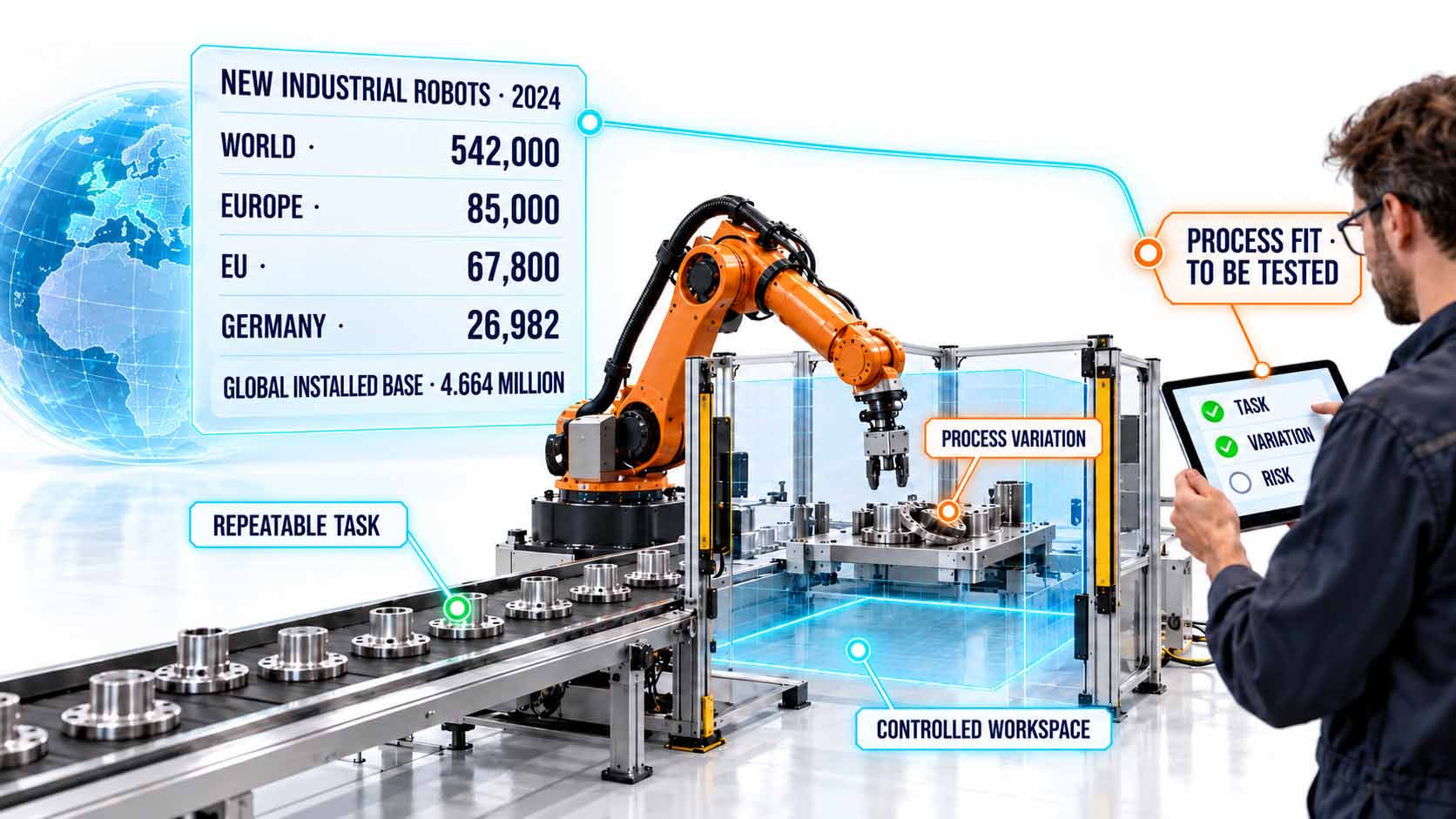
The market figures show how widespread robots are, but suitability for one’s own process remains the open question.
Infographic: Newly installed industrial robots in 2024 and the transition from worldwide adoption to the company-level suitability check[1] | AI-assisted illustration, not a product photo | XR Stager Online Magazine | VISORIC GmbH
For decision-makers, this leaves a simple but decisive guiding question: which task in your own company would be small enough for a safe trial and important enough that a team actually learns something from it?
- Worldwide, around 542,000 industrial robots were newly installed in 2024.[1]
- With 26,982 installations, Germany is the largest market in Europe.[1]
- 58 percent of the employers surveyed expect changes from robotics by 2030.[2]
- 39 percent of core skills are expected to change by 2030, according to employers’ expectations.[2]
- An educational robot is a conversation starter, not a substitute for planning and training.
How this learning can begin with little risk depends on which kind of kit is meant. The next chapter explains this.
What Companies Mean by a Robotics Kit
The term kit is an umbrella term for very different products. It is worth distinguishing four categories. First, construction sets with sensors, motors and modular parts, suited to mechanics and control basics. Second, ready-made educational robots, such as mobile platforms or small two-legged systems, which are ready to use but can be programmed differently depending on the manufacturer. Third, compact robot arms and teaching cells, which are closer to industrial gripping, programming and safety tasks. Fourth, virtual kits and simulators, with which movements and processes can be tried out without real hardware. In practice, some products combine several categories.
Two robots from the same manufacturer illustrate the difference. The Reachy Mini is a kit for self-assembly: whoever orders it receives individual parts, assembles the robot and then programs it.[5] The Microduck, by contrast, is a ready-made two-legged robot that runs right out of the box and whose movements can be retrained in a simulation.[6] Both come from Pollen Robotics, which belongs to the AI platform Hugging Face.[6] Chapter 4 introduces them in detail.
The word kit tells you nothing reliable about learning curve, robustness, maintenance, safety level, data sovereignty or compatibility. A kit may require assembly or be ready to start. It may offer block programming, the programming language Python, ROS 2, manufacturer-specific control, simulation or reinforcement learning. ROS 2 is an open software system for robotics consisting of a framework, tools and libraries; it can serve as a learning path but does not guarantee universal compatibility.[3] Reinforcement learning means that a system learns through trial, error and reward.
More important than the product is the learning goal. For team understanding, visible sensor-actuator loops often suffice, that is, processes in which a sensor measures something and a drive reacts to it. For technical depth, documented interfaces and access to raw data are needed. For preparing for industrial systems, manufacturer environments or simulation models of the later target technology matter more than an arbitrary small robot. Providers such as ABB offer their own practical and virtual robotics training for this.[4]
The total effort also belongs in the calculation. The purchase price is only part of the cost; added to it are time for assembly, integration, maintenance, charging cycles, documentation, facilitation and evaluation. For the Microduck, the robot costs 399 US dollars according to the manufacturer, and a spare-parts pack with additional motors, batteries and a charger adds 119 US dollars, for a total of 518 US dollars before taxes and shipping.[6] A cheap kit can become an expensive project if nobody supports the learning format. Conversely, a somewhat more expensive system with a good simulator and clear documentation can offer more learning value per hour.
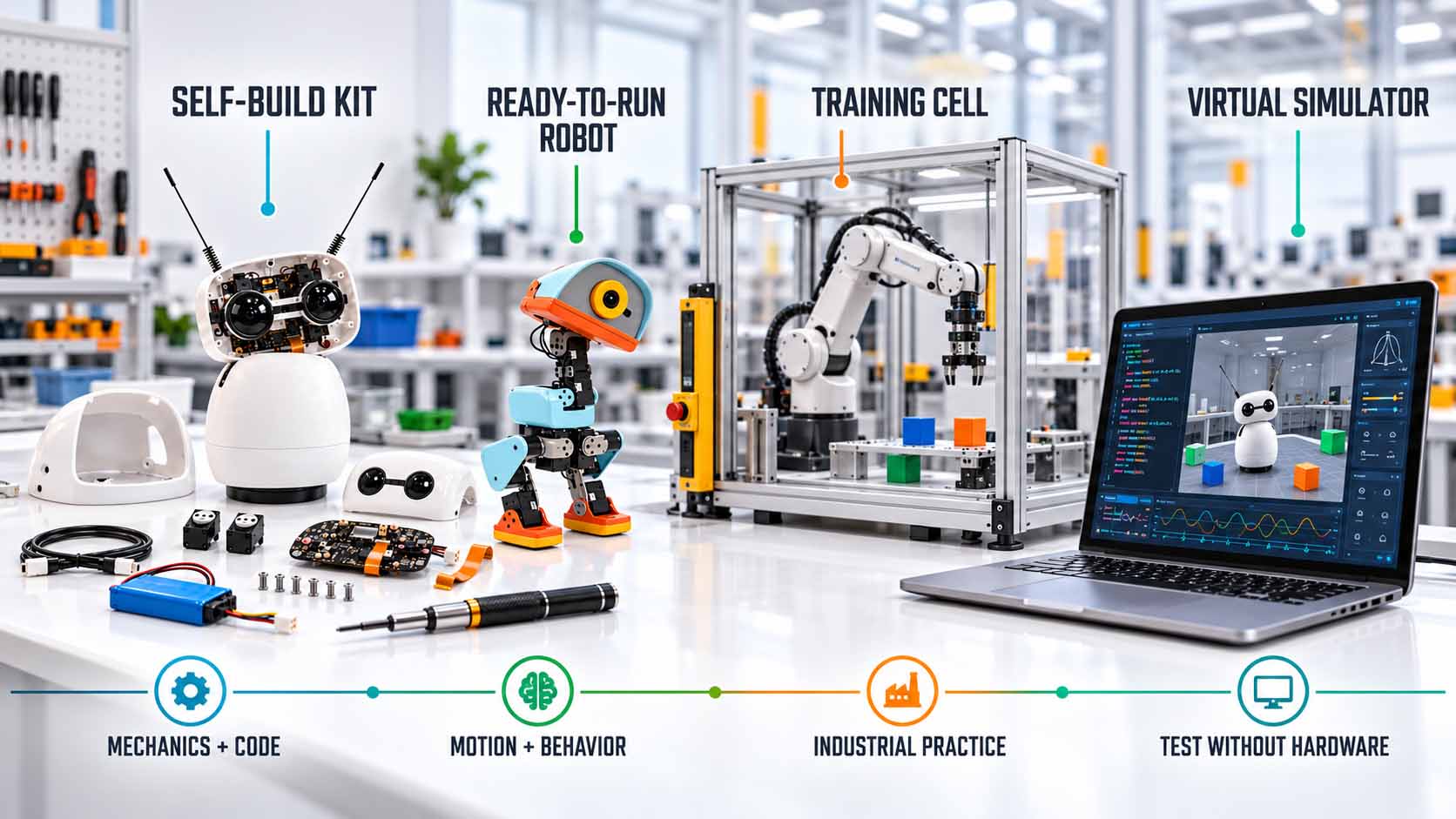
Four kinds of robot kits open up different learning paths and require different amounts of effort.
Infographic: Editorially developed typology of robot kits with the learning focuses self-assembly, ready-made educational robot, teaching cell and simulation | AI-assisted illustration, not a product photo | XR Stager Online Magazine | VISORIC GmbH
| Kit type | Example | Well suited for | What to watch for |
|---|---|---|---|
| Construction kit, self-assembly kit | Reachy Mini | Assembly, programming, interaction with camera and microphone | Assembly time, expert support, early development phase |
| Ready-made educational robot | Microduck | Quick start, movement and training in simulation | Programmability differs by platform |
| Compact robot arm, teaching cell | Teaching cells from robot manufacturers | Gripping, programming, first safety questions | Higher effort and safety requirements |
| Virtual kit, simulator | Physics simulation of both robots | Trying out processes without hardware | Result depends on the model assumptions |
Each kit type is strong in one dimension and weak in another.
Table: Editorially developed orientation for selecting robot kits, not a ranking and not a product comparison | XR Stager Online Magazine | VISORIC GmbH
For the selection, organizational questions are also worth a look: are spare parts available? Is the hardware suitable for the intended room and group of users? What rules apply to battery, movement and supervision? Chapter 6 covers the software questions. Different roles should be involved here: operations, maintenance, IT, occupational safety and personnel development. That the robot thereby becomes a shared learning object is a plausible design recommendation, not a documented study result.
- Robot kit is an umbrella term for four very different kinds of product.
- The learning goal decides the selection, not the hardware.
- ROS 2 is an open robotics ecosystem, but not a compatibility guarantee.[3]
- Providers such as ABB offer practical and virtual robotics training.[4]
- Effort includes assembly, maintenance, documentation and facilitation, not just the purchase price.[6]
Once it is clear which kind of kit is meant, the question is what actually happens technically when a robot is programmed. The next chapter shows this.
From Sensor Value to Motor Command
What actually happens when a robot is programmed? Five steps repeat in almost every educational robot. First, a camera, microphone or orientation sensor delivers data. Second, a program reads and evaluates this data. Third, a rule or a model makes a decision. Fourth, the manufacturer’s software kit, SDK for short (software development kit), translates the decision into a movement command for the motors. Fifth, the sensors report back what actually happened, and the loop starts over. In the Microduck, according to the manufacturer, the behavior rule runs 50 times per second directly on the robot.[6]
With the Reachy Mini, this can be shown in a few commands. The example program in the wiki of the manufacturing partner Seeed Studio points the head at a target position with a single command and specifies a duration of one second for it. Further commands retrieve a camera image, record sound or play sound through the speaker.[7] The manufacturer’s website additionally promotes a JavaScript SDK with which the robot can be controlled in three lines.[8]
A simple experiment combines these building blocks: the robot retrieves a camera image, determines where an object is in the image, points the head at it, triggers the movement and logs how far the object still is from the center of the image. This is an editorial example of the sequence, not tested program code.
How much decision-making lies with the program distinguishes three levels. With a direct command, the human specifies a position, for example: move the head to the left. With rule-based behavior, the program follows a fixed rule, for example: follow an object as long as it is visible. With AI-supported behavior, a model recognizes speech, gestures or objects and suggests a reaction. The Reachy Mini’s application offering includes examples: a hand tracker, in which the robot follows hand movements, and a conversation assistant based on a large language model.[7] The Microduck is on the third level; its movements are not fixed commands but learned behavior rules, so-called policies.[6]
For teams, this chain is a practical tool. Anyone who knows the five steps can ask precisely where an error arose: did the sensor deliver wrong values? Did the program misinterpret them? Was the decision unsuitable? Was the command translated incorrectly? Or did the environment, such as different lighting or a different surface, change the result? This is the basis for error analysis, test cases and conversations between IT, operations and the specialist department.
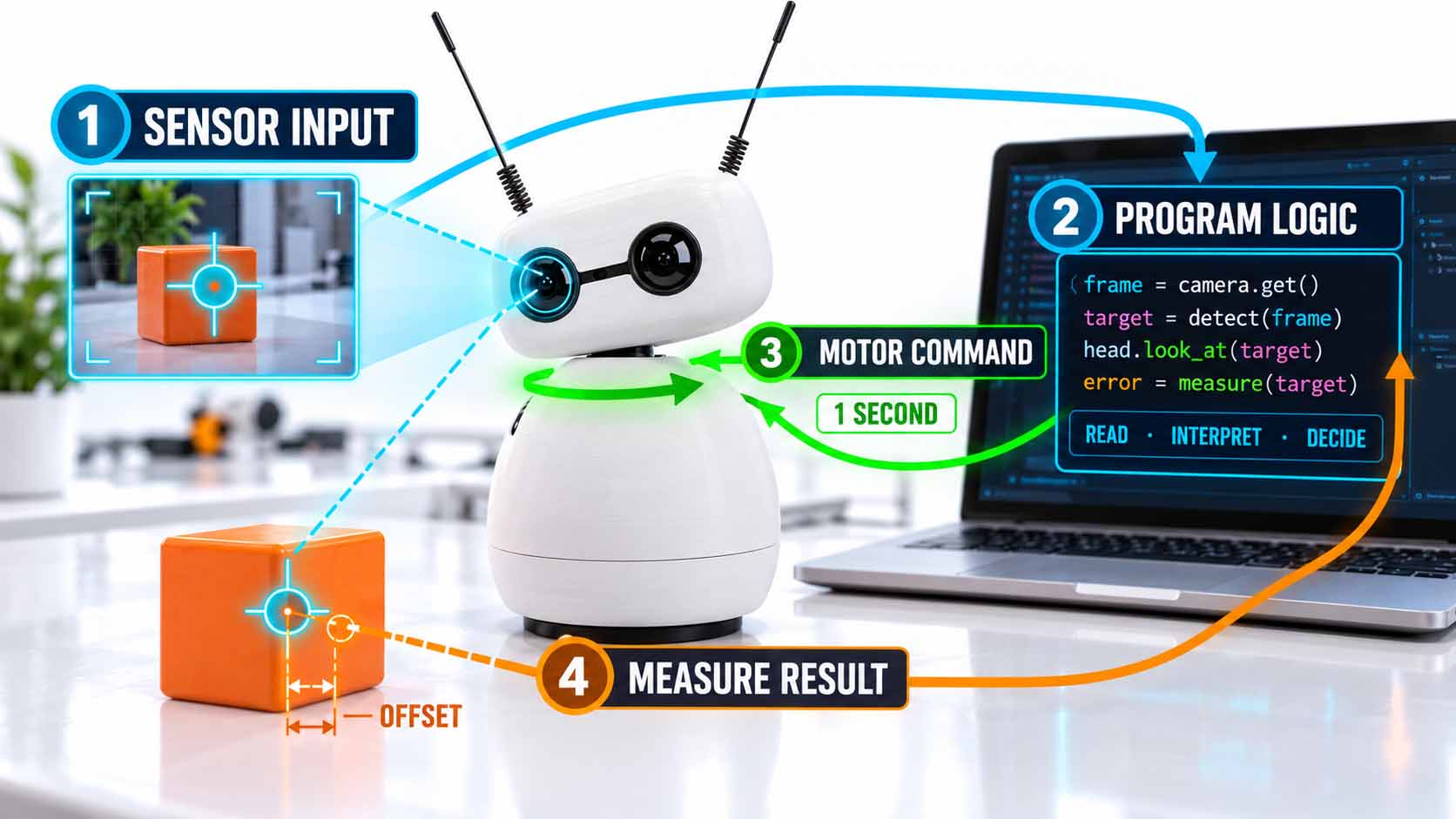
Between measurement and movement lies a chain that can be checked step by step.
Infographic: Loop from sensor value via program logic and motor command to measuring the result, program code illustrative[6][7] | AI-assisted illustration, not a product photo | XR Stager Online Magazine | VISORIC GmbH
This also makes clear why an educational robot teaches more than programming alone: it shows that robotics consists of a chain of assumptions that can be checked one by one.
- Programming here means: measure, evaluate, decide, translate and check the result.
- According to the manufacturer, the Microduck runs its behavior rule 50 times per second.[6]
- According to the example program, the Reachy Mini moves its head with a single command.[7]
- Direct command, rule-based behavior and AI-supported behavior are three levels of control.
- When an error occurs, one can ask precisely in which of the five steps it arose.
How such learning objects look in concrete terms is shown by two robots as case studies. That is the subject of the next chapter.
Reachy Mini and Microduck as Case Studies
Two robots from the manufacturer Pollen Robotics show how differently learning with robotics can look. Pollen Robotics belongs to the AI platform Hugging Face, on which developers publish and share models and applications.[6] The first robot is built and programmed, the second is trained.
The Reachy Mini is a desktop robot 28 centimeters tall and weighing 1.5 kilograms, for human-robot interaction, creative programming and AI experiments. It has a movable head with six axes of movement, rotation of the entire body, two animated antennas, a wide-angle camera, four microphones and a 5-watt speaker.[5] It is delivered as a kit. According to the manufacturing partner Seeed Studio, assembly takes two to three hours, and an interactive online guide leads through the steps.[7] There are two versions: the Lite version is connected by cable to a Mac or Linux computer; the Wireless version includes its own small computer of the Raspberry Pi 4 type, Wi-Fi, battery and an acceleration sensor.[5]
How the Reachy Mini can be programmed is described in chapter 3. In addition there are ready-made applications via the Hugging Face platform and a simulation in MuJoCo, a physics simulation for movements, with which programs can be tested before the robot is delivered.[5][7] At launch, the manufacturer provided more than 15 prefabricated behaviors, and the community on the chat service Discord comprises more than 9,000 members according to the manufacturer.[5][8]
The Microduck, by contrast, is a ready-made two-legged robot. According to the manufacturer, it is 25 centimeters tall and weighs around 800 grams. It has 15 motors, a camera, a LiDAR sensor that measures distances by laser, and two orientation sensors, so-called IMUs, which detect tilt and acceleration. The box contains the robot, battery, USB-C cable and a game controller.[6] Seven pretrained movements are included, among them walking, sitting and standing up, kicking, grabbing and standing back up on its own. Roller skating only works with the rollers from the accessory pack.[6] The robot is available in four color variants.
For a learning format, the software is decisive for the Microduck. The robot’s behavior rules are trained in the MuJoCo physics simulation and transferred to the real robot. The manufacturer describes a cycle of training in simulation, transferring to the robot, refining and publishing. The software, the simulation and the complete training via reinforcement learning are available under the free Apache-2.0 license on the developer platform GitHub.[6] The Microduck was introduced on August 27, 2026, and pre-orders have been open since.[6][9] The introductory price is 399 US dollars before taxes and shipping; optional packs cost between 39 and 119 US dollars.[6]
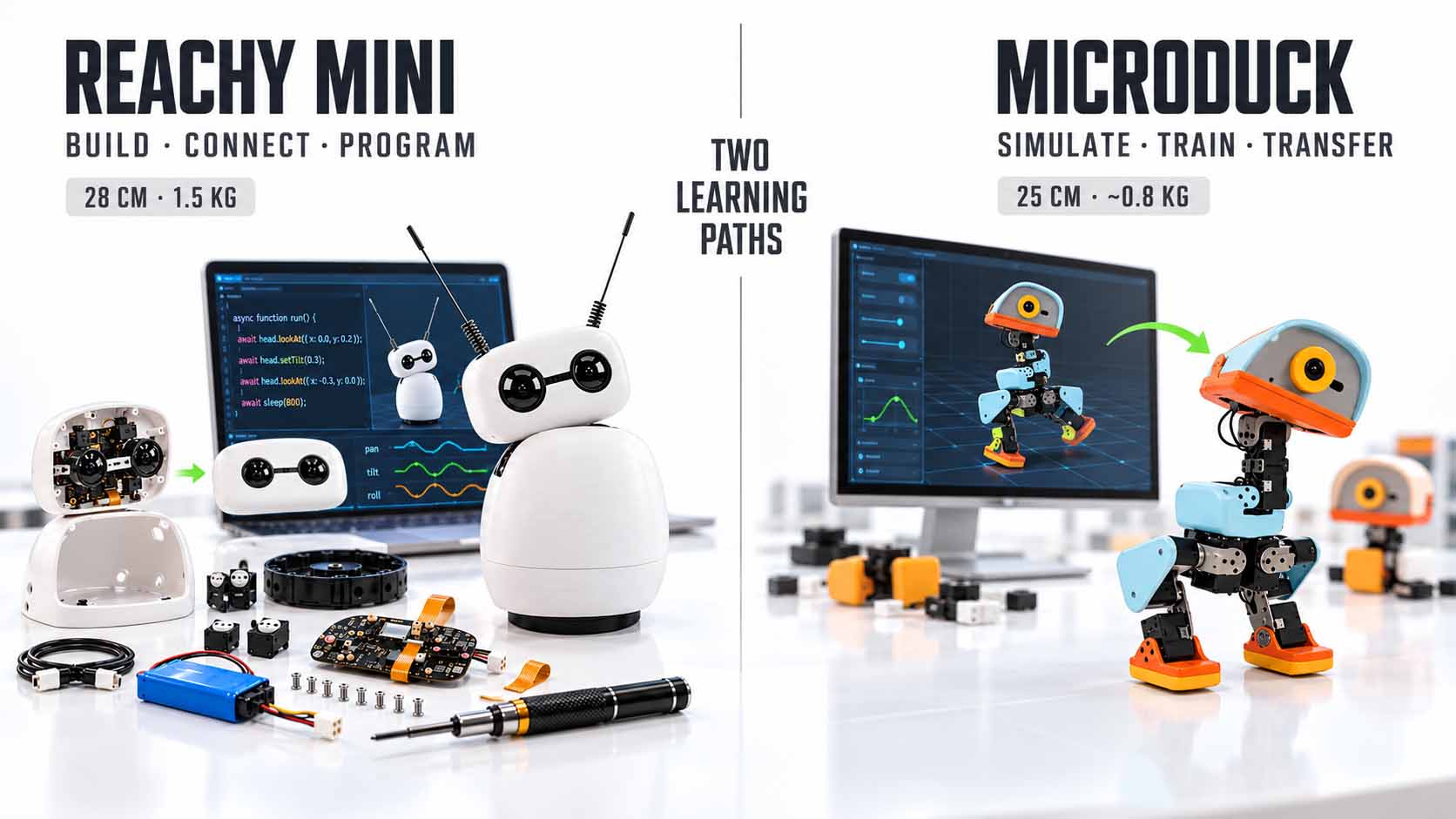
One robot is built and programmed, the other receives its behavior through training in simulation.
Infographic: Comparison of the learning paths of Reachy Mini and Microduck according to manufacturer information from Pollen Robotics[5][6][7] | AI-assisted depiction modeled on the named robots, not a product photo | XR Stager Online Magazine | VISORIC GmbH
| Feature | Reachy Mini | Microduck |
|---|---|---|
| Type | Self-assembly kit, is assembled | Ready-made robot, playable right away |
| Size and weight | 28 cm, 1.5 kg | 25 cm, about 800 g |
| Sensors | Wide-angle camera, 4 microphones, 5-watt speaker | Camera, LiDAR, 2 orientation sensors |
| Movement | Head with 6 axes, body rotation, 2 antennas | 15 motors, walking, kicking, grabbing, standing up |
| Price according to manufacturer, before taxes and shipping | from 399 USD (Lite), 499 USD (Wireless) | 399 USD (introductory price) |
| Date of price information | July 9, 2025 | October 26, 2026 |
Two educational robots, two designs, two price dates.
Table: Reachy Mini and Microduck at a glance, manufacturer information, not independently verified[5][6] | XR Stager Online Magazine | VISORIC GmbH
Both devices are described here using manufacturer information; they have not been independently tested. For the Reachy Mini, the manufacturer itself pointed out at the start of sales that the device is in an early development phase and is offered without warranty.[5] That does not argue against its use as a learning object, but it does argue against use in a production system. Prices and delivery times may have changed since and should be checked on the manufacturers’ websites before procurement.
- Reachy Mini is a kit that, according to the manufacturing partner, is assembled in two to three hours.[7]
- It can be tested beforehand in a simulation, and ready-made applications come via Hugging Face.[5][7]
- The Microduck runs right away and learns new movements through training in simulation.[6]
- The software and simulation of both robots are open source.[5][6]
- No independent test of the devices exists; the Reachy Mini was considered an early development phase at launch.[5]
What both robots have in common is the path from simulation to the real robot. The next chapter shows how it works.
From Simulator to Real Robot
The technical term for this is sim-to-real, roughly the path from simulation to reality. A simulation model virtually reproduces mechanics, sensors and environment. There, behavior rules can be tested or learned. When a policy works well enough, it is transferred to the real hardware. Afterwards, one checks where the behavior deviates, and the model or policy is adjusted. The Microduck shows this loop on a small scale: according to the manufacturer, its movement policies run in the MuJoCo physics simulation and can be transferred to the device.[6] The Reachy Mini also offers a simulation in which programs can be tested before the robot is delivered.[5]
Simulation is attractive because it allows many repetitions without constantly resetting a device by hand, can reduce the number of physical test runs and makes parameters controllable. With Isaac Sim, NVIDIA describes an environment for simulation, testing and the generation of synthetic training data.[10] This is a manufacturer offering, but it shows that simulation is now part of industrial development workflows.
A simulation, however, is only as helpful as its assumptions. Friction, material deformation, camera noise, lighting, cables, wear, network delay and changes in the environment are hard to reproduce completely. This is called the reality gap, the gap between model and reality: behavior that is successful virtually can fail in reality. A good way of dealing with it is not to hide this gap as a defect but to treat it as a systematic verification task.
That industry takes the transfer seriously is shown by a Reuters report of March 9, 2026. According to it, ABB and NVIDIA are working on a solution that incorporates more realistic light, shadow, texture and vibration effects into simulations. A pilot at Foxconn for a demanding assembly task was mentioned; at the time of the report, the technology was announced for the second half of 2026.[11] This is an indication of the direction of development, but not a proven success rate.
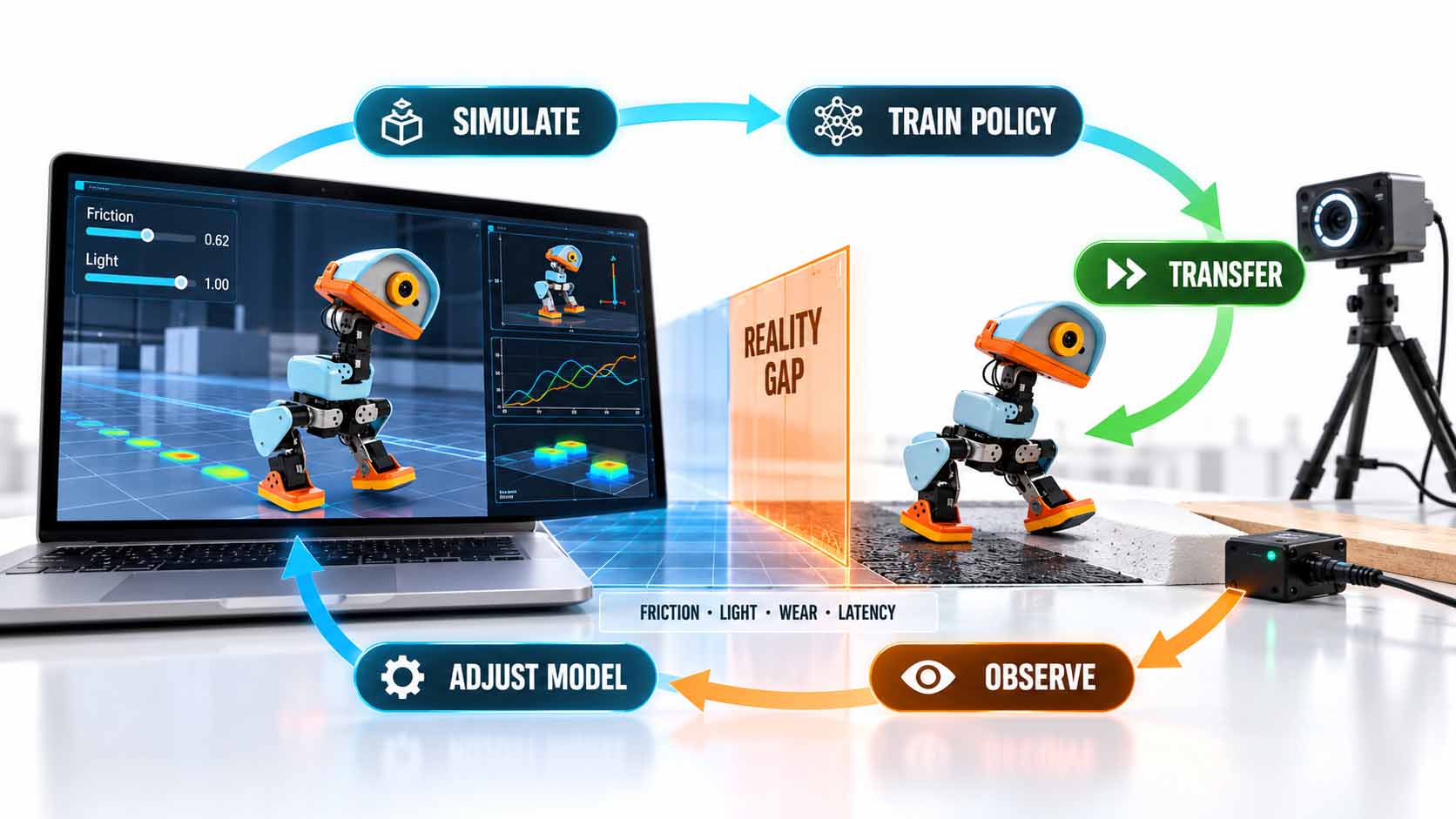
The difference between simulation and reality is the actual learning question.
Infographic: Loop from simulation via training and transfer to observation on the real robot and adjustment of the model[6][10] | AI-assisted illustration modeled on the Microduck, not a product photo | XR Stager Online Magazine | VISORIC GmbH
What teams take away from this on a small scale is above all a way of thinking: make requirements explicit, vary conditions, test errors reproducibly, document data and compare digital models with real observations. Not easily transferable are the specific movement data, policies, safety proofs or performance results of a mini robot to a robot arm, an automated guided vehicle or a production line. A kit does not automatically train factory robotics. But it can familiarize teams with the same basic questions: what does the system measure? What does it decide? What happens when the real world deviates from the model?
- Sim-to-real means: learn in simulation, check on the real device, adjust.
- According to the manufacturer, the Microduck shows this loop on a small scale.[6]
- Simulation is an integral part of industrial development.[10]
- The reality gap makes validation on the real system indispensable.
- ABB and NVIDIA announced more realistic simulations; a pilot project was reported.[11]
This raises the question of what companies should look for in the software behind such robots. The next chapter shows this.
What Companies Should Check in the Software Stack
An educational robot does not consist only of motors and sensors but of several layers of software. Experts speak of a software stack, roughly a layered structure. At the very bottom are sensors and motors. Above them sit drivers, which translate between hardware and software, then the robot SDK as a toolbox for developers, and above that the behavior made up of rules, models or policies. Alongside stands the simulation, and at the very top the application that the human operates. For a company, it is helpful to check each layer individually.
Eight questions help with this. Which programming languages and SDKs are supported? Is the software openly documented? Can the robot be operated locally? Which data is stored or transmitted? Can sensor values and movements be logged? Is there a simulation with the same control model? Can programs be versioned and tests reproduced? How easily can what has been learned later be transferred to other systems?
Reachy Mini and Microduck answer these questions differently. For the Reachy Mini, Python and JavaScript control are in the foreground. The manufacturer also states that by default the robot does not store or transmit personal data and that neither Pollen Robotics nor Hugging Face has access to data from the robot.[5][7] The simulation can be installed as an add-on to the same software package that contains the robot control.[7] For the Microduck, the SDK, simulation and training process are open source under the Apache-2.0 license, and a command-line tool called robotctl serves to monitor, configure and update the robot.[6] For the Microduck’s data protection, the sources checked contain no information; this question would have to be clarified before procurement.
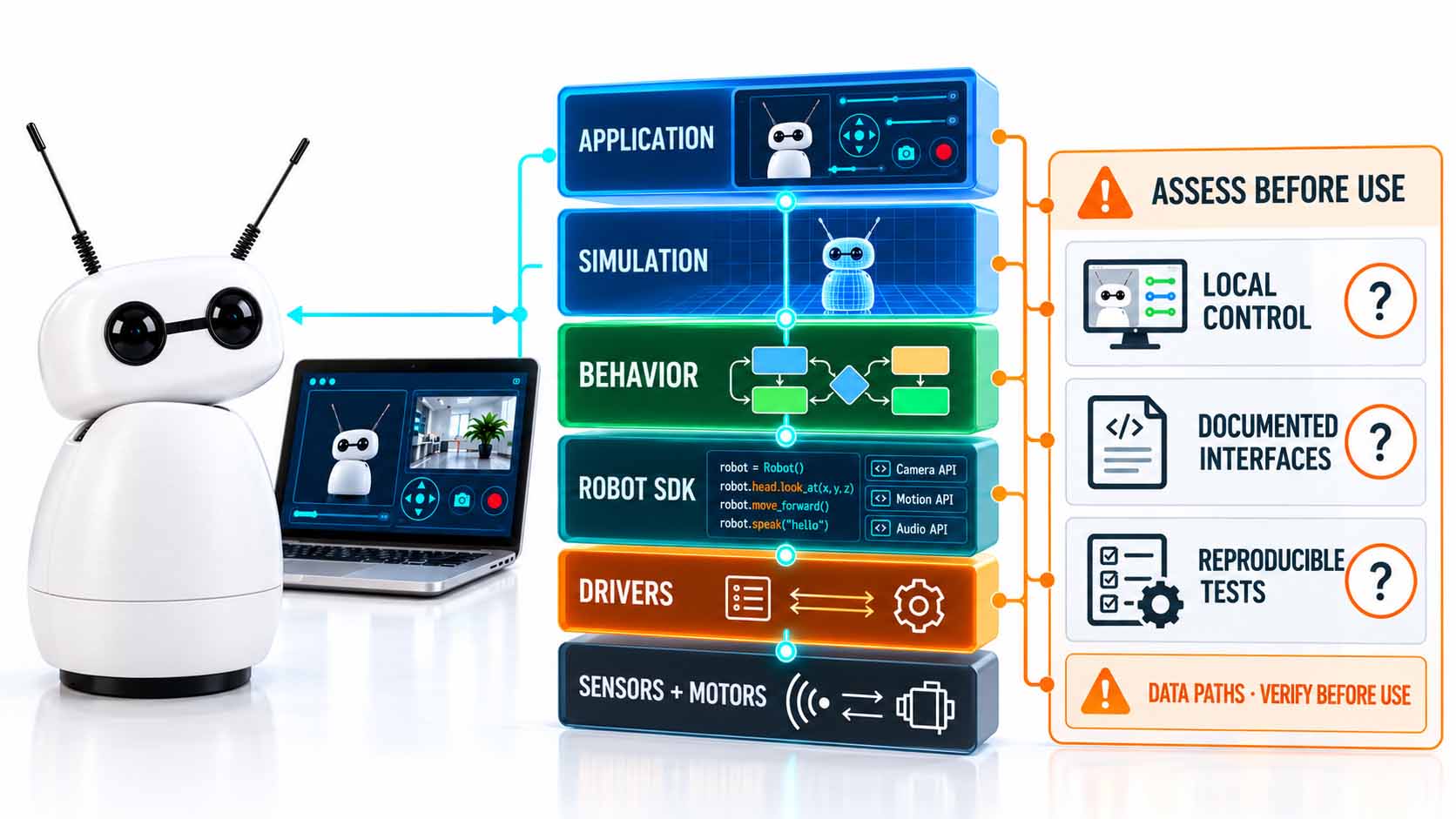
Open software is only useful when its layers, interfaces and data paths remain verifiable.
Infographic: Software stack of an educational robot from hardware to application with key check questions for companies[5][6][7] | AI-assisted illustration, technical layers shown schematically, not a product photo | XR Stager Online Magazine | VISORIC GmbH
| Layer | Reachy Mini | Microduck |
|---|---|---|
| Application | Interaction, camera, speech | Movement and balance |
| Control | Python and JavaScript | Policies and open-source robotics SDK |
| Simulation | MuJoCo | MuJoCo |
| Focus | Programming | Training |
| Result | Executed sequence | Learned behavior |
Same simulation, different focus in the software.
Table: Reachy Mini and Microduck at the level of the software stack, manufacturer information, not independently verified[5][6][7][8] | XR Stager Online Magazine | VISORIC GmbH
Open software means more than available source code. What matters are documented interfaces, controllable data and reproducible tests. This includes whether programs can be versioned like any other source code and whether a test with the same settings delivers the same result. It helps to log sensor values and movements from the start. On transferability: mainly the concepts and ways of working can be transferred, not the individual programs. Whether a kit fits an open robotics system such as ROS 2 has to be clarified product by product.[3]
- A software stack consists of layers from the sensors to the application.
- Eight check questions cover languages, documentation, local operation, data, logging, simulation, tests and transferability.
- According to the manufacturer, the Reachy Mini does not store personal data by default.[5]
- The Microduck, including its SDK and simulation, is licensed under Apache-2.0.[6]
- Open software means: documented interfaces, controllable data, reproducible tests.
How the path from the tabletop experiment into everyday work can be prepared is shown in the next chapter.
XR and Digital Twins as a Bridge into Everyday Work
Two terms deserve a brief clarification. A digital twin is a digital representation of a specific product, system or process that, depending on the application, is connected to geometry, behavior, simulation or operating data. Not every 3D model is therefore a complete digital twin. XR is the umbrella term for augmented, virtual and mixed reality, that is, for digital content that extends real environments or replaces them entirely with virtual ones. Siemens describes robot simulation as a digital representation for interaction and verification in a virtual environment and digital twins as a link between simulation and operating data.[12][13] Both are vendor descriptions of platform capabilities, not automatic project success.
An XR training environment can make operating procedures, ranges of movement, safety zones and plant layouts visible. Employees can practice variants without blocking a real production line and discuss spatial relationships together. For haptic fine motor skills, tools or social interaction, real practice may still be necessary.
The research shows potential, but limited. In an experiment with 24 students on an ABB robot of type IRB 120, the VR group needed less time and achieved higher pass rates; many participants found VR a helpful preparation.[14] Sample and tasks are small, and the result is not general proof of productivity. A case study on a KUKA robot found the effectiveness of a VR self-learning task for a certain light maintenance task comparable to traditional instruction.[15] Together, the studies point to potential and dependence on context.
A sensible learning setting consists of four building blocks. The learning goal defines which task and which behavior are to be understood. The model determines which geometry, physics, sensing and process logic are included. The interaction makes it possible to try out, observe and receive feedback. The transfer clarifies which real action or decision subsequently improves. If one of these building blocks is missing, the risk is a pretty demo without learning effect.
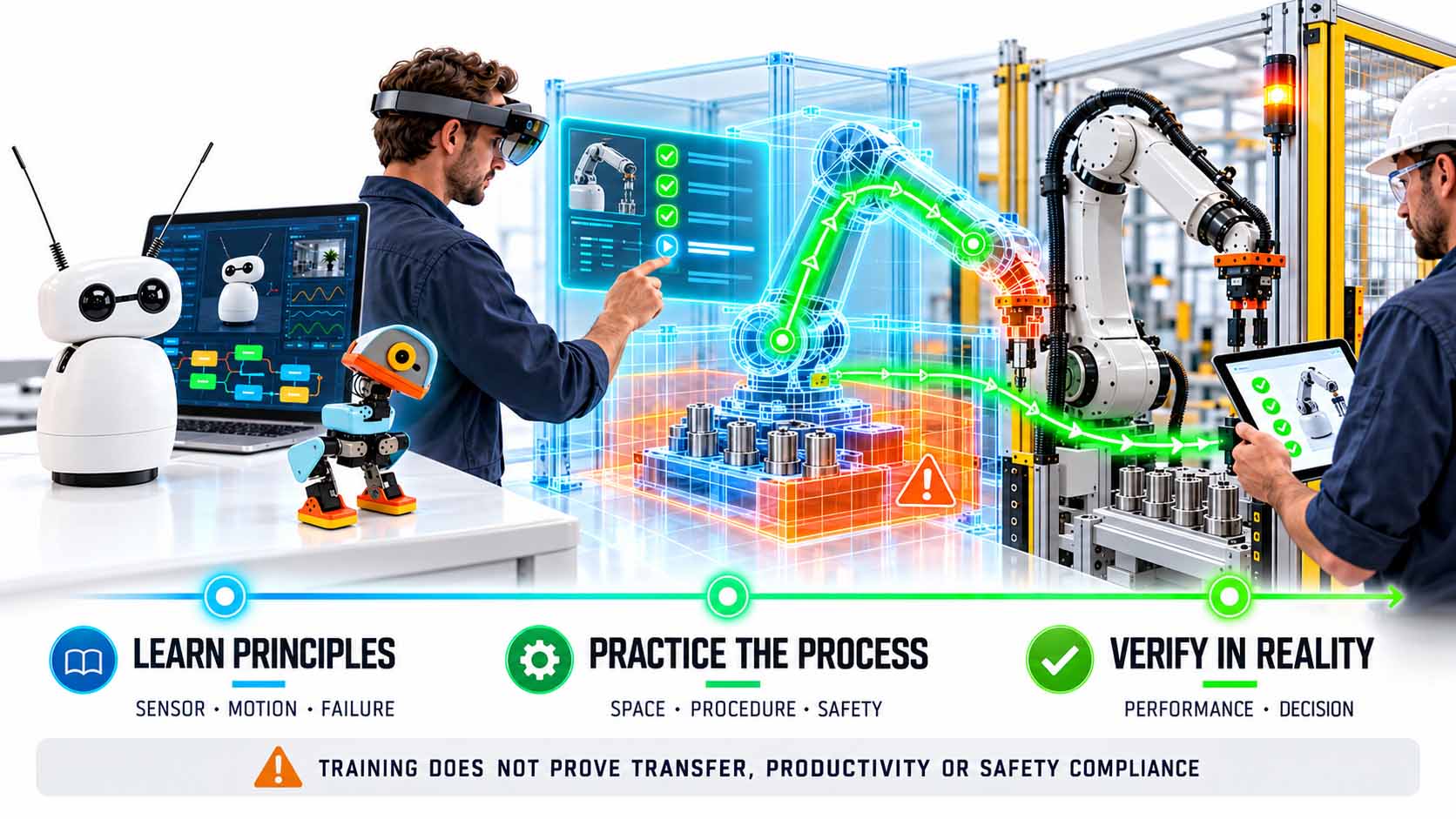
Each stage teaches something different, and each has a limit to what it can show.
Infographic: Learning path from the small educational robot via a digital work environment to verification on the real plant[13][14][15] | AI-assisted illustration, not a product photo | XR Stager Online Magazine | VISORIC GmbH
Whether such a learning setting works can be measured: can the person correctly explain the sequence of work steps before and after the exercise? Do they recognize danger zones and deviations? How many runs do they need to reach the goal? Which errors still occur later on the real plant? For the leap from tabletop experiment to work process, learning spaces are needed that make real processes understandable and let variations be experienced safely. This is exactly where XR training and digital twins can form the next step, as long as they are not understood as a substitute for real practice and validation. An illustrative twin is only as good as its data, model assumptions and updating.
- A digital twin is more than a 3D model; it links model and data.[13]
- XR can make processes, ranges of movement and safety zones visible.
- A study with 24 students showed advantages of VR training in individual tasks.[14]
- A KUKA case study found VR self-learning comparable to traditional instruction.[15]
- A good learning setting needs learning goal, model, interaction and transfer.
How all of this becomes a concrete decision is shown in the closing chapter.
From Experiment to Business Case
A pilot begins with the task, not with the device. Before buying a kit, a team should name a work task that is recurring, clearly delimited and harmless for a workshop. Then it is clarified which capability is to be tried out: perception, grasping, navigation, collaboration or troubleshooting. A task with clear boundaries makes the learning gain comparable.
A 90-minute workshop suggests itself as an entry point, here with the title Detect, React, Explain. In the first ten minutes, the team chooses a company-related context, for example locating an object or following a simple route. Then small groups formulate hypotheses and a success measure. In minutes 25 to 50, they test a predefined behavior and change only one condition at a time: light, distance, surface or obstacle. Afterwards they document errors and causes and, in the last 20 minutes, transfer the insight to a real work task. So that the workshop remains more than an entertaining event, key figures are set in advance: time to the first working change, share of successful runs, identified error causes, number of documented assumptions and the quality of a possible pilot use case. These are workshop metrics, not a guarantee of later productivity gains. Each team also writes a short experiment log with task, setup, conditions, result, surprise and next question.
The evidence for this should be classified honestly. Research on educational robotics mainly examines schools, universities and structured learning environments; a systematic review looks at robotics as a didactic tool in STEM teaching.[16] It cannot be inferred from this how much a kit improves employees’ competence or productivity. Reports by manufacturers such as ABB on practical robotics training are likewise vendor sources and not independent proof of effectiveness.[17] All that can seriously be said is: kits create a concrete practice environment whose benefit depends on learning goal, support and transfer. A single workshop does not turn employees into robotics specialists, but it can foster curiosity, basic concepts and better project questions.
Economic viability can also be captured credibly without inventing figures. For the educational kit, what counts is purchase and running costs, preparation time, participation time, number of documented insights, follow-up questions and concrete pilot decisions. For later automation, cycle time, quality, availability, maintenance, integration costs, safety effort, investment and payback are added. A learning workshop alone does not allow a reliable extrapolation to these figures. Getting started is also worthwhile because, according to the World Economic Forum, employers expect changes from robotics and automation.[2]
Where an educational kit ends should be named just as clearly. A small two-legged robot, a desktop robot and an industrial robot cell differ in payload, reach, speed, repeatability, control and work area. As soon as robots enter real work areas, hazards, safe speeds, emergency stop, protective measures and the collaboration of human and robot must be assessed by qualified experts. A workshop with a mini robot is no proof of the conformity of a later plant. Industrial projects, moreover, rarely fail only because of the robot’s movement; the hurdles often lie in interfaces, process variants, space, maintenance and responsibilities. In a position paper, the industry association IFR places task shifting, productivity and further qualification at the center; this is an association perspective.[18] None of the sources used proves a general return on investment of educational kits; possible chains of effect are hypotheses.
A 30-day approach turns this into a concrete plan. In week 1, the process question and success criterion are defined. In week 2, the workshop takes place, supplemented for a self-assembly kit such as the Reachy Mini by a build block of two to three hours.[7] The data is logged. In week 3, operations, IT, safety and the specialist department evaluate the findings together. In week 4, the decision is made on whether a digital twin, a simulation, a manufacturer consultation or a clearly limited real trial makes sense. How digital twins can support the validation of robot fleets in facilities is shown, for example, by an NVIDIA example, which should be classed as a manufacturer example.[19] If there is no benefit, the trial ends; if there is a plausible use case, a precise next step emerges.
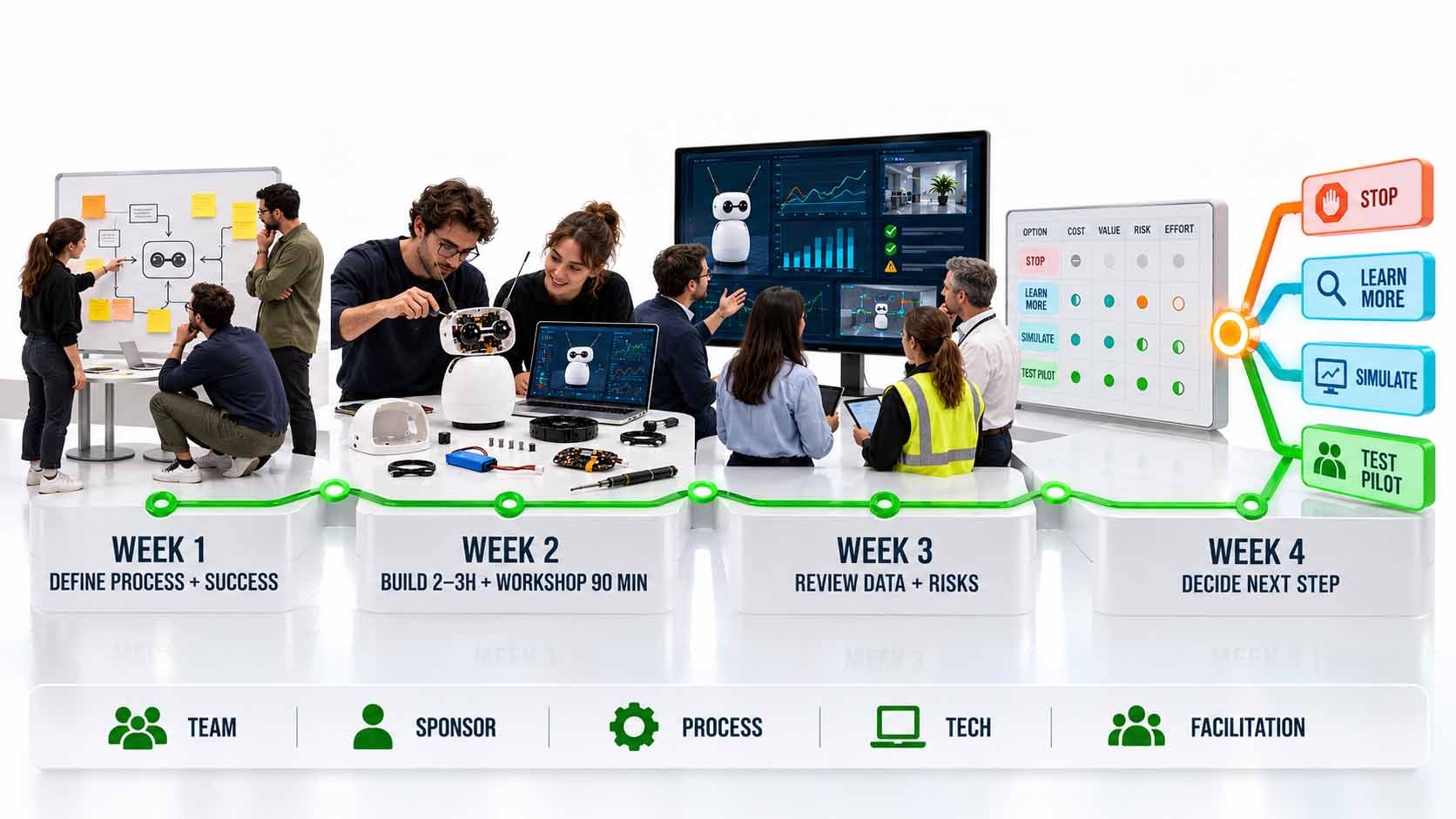
At the end of the learning experiment stands a traceable decision on the next step.
Infographic: 30-day plan from the learning experiment via workshop and evaluation to the decision on how to proceed[2][19] | AI-assisted illustration, not a product photo | XR Stager Online Magazine | VISORIC GmbH
Success requires clear roles. A sponsor secures time and the decision path. A subject-matter expert defines the task. Technical support takes care of setup and reproducible tests. A facilitator connects the findings with the company’s problem. For every real trial, the responsible bodies for safety and data protection must be involved. In the end, it should not just say that was exciting, but a clear decision: stop, keep learning, simulate or examine a limited pilot.
- A pilot begins with a clearly delimited, harmless task.
- A 90-minute workshop with a log and key figures defined in advance makes learning comparable.
- Studies on educational robotics mainly come from schools and universities; vendor reports are no proof of effectiveness.[16][17]
- A workshop replaces no safety assessment and permits no extrapolation to later automation.
- A 30-day plan leads from the experiment to one of four clear decisions.
The small robot does not have to replace a factory to be valuable for companies. It can be a learning object through which teams learn early what sensing, movement and AI mean in the real world. What matters is what they take from the trial into the next, larger scale. How such a robot looks in motion is shown by the following video.
The Microduck in Motion
The preceding chapters explained what makes educational robot kits what they are, what teams learn from them and where the limits lie. How such a robot actually comes across is best observed in motion.
The following video shows two Microducks moving in coordinated fashion. Hardware and product idea come from the manufacturer Pollen Robotics. While watching, three things are worth noticing: how the robot keeps its balance, how it reacts to its own movements and how a small device only 25 centimeters in size can show so much behavior at all. No technical properties can be derived from the video alone; the hardware details come from the manufacturer’s documentation.[6]
Video: Microduck from the manufacturer Pollen Robotics in motion | Visuals by original creators | Analysis: Ulrich Buckenlei | XR Stager Online Magazine | VISORIC GmbH
The robot’s friendly appearance can lower the entry barrier for a broad audience. That is an editorial observation, not a scientifically proven learning advantage. What matters is what follows: the technical substance with the question of which sensors, which movements and which software are behind it, and the learning question that a team derives from it for its own operations.
- The video shows two Microducks moving in coordinated fashion.
- Hardware and product idea come from Pollen Robotics.[6]
- Technical properties come from the manufacturer documentation, not from the video.
- The friendly appearance lowers the entry barrier but does not replace substance.
- The question remains: what can teams learn from a small robot?
This example makes tangible why the path from a small learning object to a reliable pilot takes more than enthusiasm.
From Learning Experiment to Reliable Pilot
A small robot makes robotics understandable, and a digital learning environment makes the next step preparable. When the experiment turns into a concrete process use case, a learning and simulation environment is needed that is spatially comprehensible, close to the actual process and pursues clear learning goals.
The expert team at VISORIC GmbH in Munich combines more than 15 years of experience in 3D, AI and XR with practical experience in spatial computing, real-time 3D and digital twins. VISORIC develops digital twins and XR trainings with which companies can prepare the collaboration of people, AI and robotics. The benefit arises from the combination of real process questions, suitable digital models and targeted practice, from the first concept idea to a deployable application.[20][21]
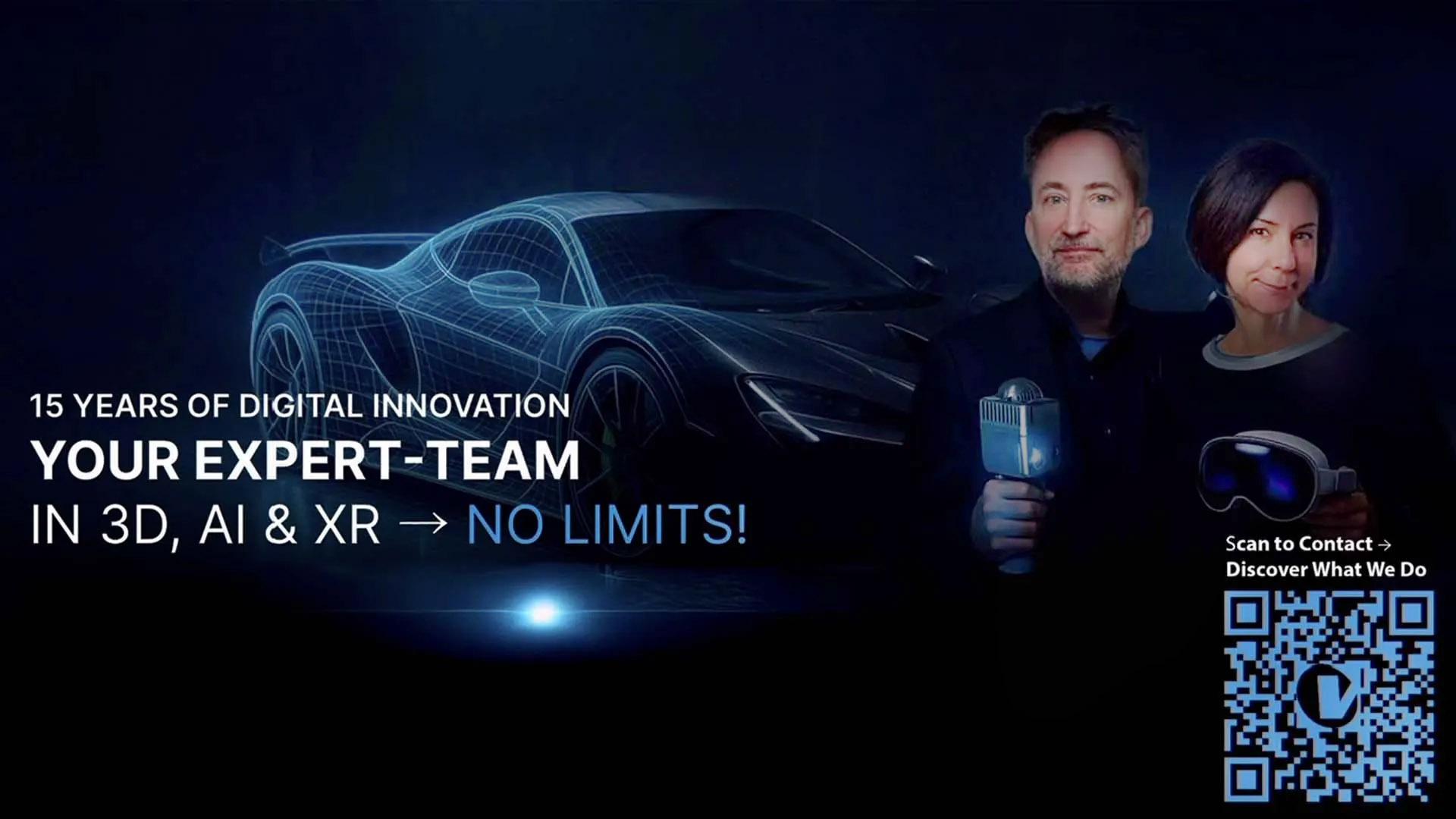
15 years of experience in 3D, AI and XR: the VISORIC expert team from Munich.
Image: © Ulrich Buckenlei | XR Stager Online Magazine | VISORIC GmbH
A well-thought-out pilot project, a single use case, a clearly delimited learning or simulation environment can often be realized much faster and more cost-effectively than many companies expect.
- Advice on choosing a sensible, clearly delimited pilot use case.
- Development of digital twins and XR training for human-AI-robot collaboration.
- From simulation to a limited pilot with measurable criteria.
This is exactly the starting point for a conversation: not the big, company-wide vision, but a clearly delimited, quickly feasible first step.
Which task in your company would be small enough for a safe trial and important enough for your team to learn from it?
Talk to the VISORIC expert team from Munich about spatial computing, digital twins and XR training. Together we will develop a precise, traceable next step from your task.
Contact:
Email: info@visoric.com
Phone: +49 89 21552678
Sources and References
- International Federation of Robotics (IFR). World Robotics 2025, Global Robot Demand in Factories Doubles Over 10 Years. ifr.org, 2025.
- World Economic Forum. The Future of Jobs Report 2025, including the chapter Skills Outlook. weforum.org, January 2025.
- Open Robotics. ROS 2 Documentation, First Steps and About ROS 2. docs.ros.org.
- ABB Robotics. Training, manufacturer offering for practical, virtual and on-site robotics training. abb.com.
- Pollen Robotics and Hugging Face. Reachy Mini, the open-source robot for today’s and tomorrow’s AI builders, announcement with prices and technical data, manufacturer information. pollen-robotics.com and huggingface.co, July 9, 2025.
- Pollen Robotics. Microduck product page, specifications, packs, simulator and open-source stack, manufacturer information. pollen-robotics.com/microduck, as of October 26, 2026.
- Seeed Studio. ReachyMini Getting Started, assembly, software and example code, wiki of the manufacturing partner. wiki.seeedstudio.com, last updated January 2026.
- Pollen Robotics. Reachy Mini, product page with notes on the JavaScript SDK, apps and community, manufacturer information. pollen-robotics.com/reachy-mini, as of October 26, 2026.
- Pollen Robotics. Meet Microduck, manufacturer announcement. pollen-robotics.com, August 27, 2026.
- NVIDIA Developer. Isaac Sim, manufacturer documentation on physics simulation and synthetic data. developer.nvidia.com.
- Reuters. ABB teams up with Nvidia to improve factory robot training. reuters.com, March 9, 2026.
- Siemens. Robotics Simulation, manufacturer description. siemens.com.
- Siemens. Digital twin, The living blueprint, manufacturer framework. siemens.com.
- Monetti et al. An experimental study of VR training on industrial robotic tasks. Procedia CIRP, 2022.
- Pratticò and Lamberti. VR self-tuition for industrial robot operators, KUKA case study. Computers in Industry, 2021.
- Trapero-González et al. Didactic impact of educational robotics on STEM learning, systematic review and meta-analysis. Frontiers in Education, 2024.
- ABB Robotics. How ABB robots are helping to educate the next generation of engineers, vendor report. new.abb.com.
- International Federation of Robotics (IFR). The Impact of Robots, position paper, industry association. ifr.org.
- NVIDIA Developer. Simulating Robots in Industrial Facility Digital Twins, manufacturer example. developer.nvidia.com, 2025.
- VISORIC field projects in digital twins, real-time 3D and spatial computing.
- XR Stager platform for real-time 3D, digital twins, knowledge AI and industrial spatial computing applications.
Contact Persons:
Ulrich Buckenlei (Creative Director)
Mobile: +49 152 53532871
Email: ulrich.buckenlei@visoric.com
Nataliya Daniltseva (Project Manager)
Mobile: +49 176 72805705
Email: nataliya.daniltseva@visoric.com
Address:
VISORIC GmbH
Bayerstraße 13
D-80335 Munich